
Add-ons are the features which the browser offers you as an extra feature apart from the inbuilt features. A web browser cannot include everything which is available on the internet, hence most of the regularly used features would be pre-installed while the others would be available as Add-ons which can be installed optionally.
To get started with the removal of the browser helper objects (BHOs), toolbars and add-ons you will have to proceed with the following steps :
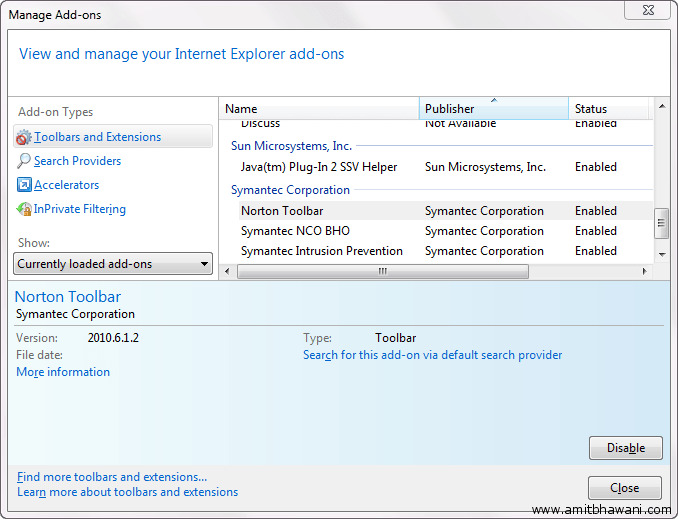
Click on the Settings Icon > Manage Add-Ons >

Next you will be shown with a new panel displaying all the Add-Ons which are currently installed on your Computers Browser.
Click on the Show > All add-ons option to display all the Toolbars and Extensions which are currently installed. Next select the ones which you are not going to use, following which the ‘Disable’ button would be displayed.
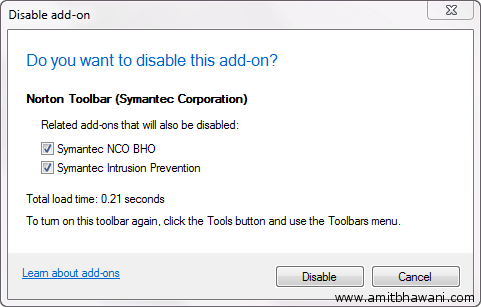
You will be displayed a small confirmation box along with the load time and other details. Click on ‘Disable’ button again and this would make sure that the add-on is completely disabled.
Close the browser and re-run it to cross verify the above acts and make sure that the changes are activated.
Great walk through for IE users. Disabling add-ons is a great way to prevent crashing, and speed up browsing. Have you checked out IE9 Beta? There is a new feature that lets you know what add-ons are working correctly and which ones are slowing down your computer.
try it here:
http://www.beautyoftheweb.com/
Cheers,
Kyler
IE Outreach Team