
 Facebook Group is the new thing, which is welcomed by everyone following which everyone has started either Creating a new Group or joining others groups. The only problem with this service is that, its disturbing a few members who are least interested in this New facebook feature.
In this article we will show you how you can stop these kind of notifications coming up to your email whenever someone ‘Adds you to a Group’, ‘Invites you to join a Group’, ‘Makes you group admin’, ‘Changes the Group name’, ‘Posts on the wall of one of your Group’ etc. There are many more preferences options which you need to first set under your profile to ensure that you get emails whenever you really are interested and not get spammed for every small change made to the Groups.

To get started click on the Account > Account Settings option from the top right side drop down section.
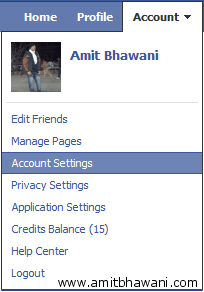
Under the Notifications tab you will find the ‘Groups’ section which displays you all the settings for the Groups. Here in you can customize the options and check on the ones which you feel would be required to you and uncheck all the other options to disable and stop notifications which are sent to your Email Account.

If you would like to make changes and set these notification rules for a specific group where you have joined, then click on the option of ‘Change email settings for individual groups’. That’s it now you will be able to get only a limited number of notifications to your account and would ensure that the ones which you have opted for would be delivered to you.

Hello Amit,
I am in a problem. Could you please help me out?
I’ve got a new BlackBerry. I want to transfer my phonebook from my Nokia 3230 to this BlackBerry. I have exported my all 1024 contacts from Nokia mobile as *.vcf format to my PC. How can I import these phone numbers to my BlackBerry?
Regards.
Protap
Post unrelated questions at http://www.amitbhawani.com/help/