
Question : Hey, i have been using the firefox browser from a while but from the time i have updated it to the version 3.6 i find that the browser is having more issues. Recently when i tried to close the browser and reopen it, it opened immediately after closing and also it didnt remember any of the tabs i earlier had. What could be the possible solution?
Answer : It seems like the problem is not with the browser version because its stable and tested by thousands of users in the beta version. The problem seems to be happening because of some browser add-on’s which could be running the processes even when you have closed the application.
Whenever you try to close the firefox browser you will be asked the following option, which would ask you to save the currently open tabs and restore the same when the browser is run again.

Once you click on the button ‘Save and Quite’ everything will be stored and restored when the firefox browser is run again. But the problem is that at times the browser would be still running in the background and if you try to run it again, you would get a message saying ‘firefox already running but not responding’. This happens because firefox uses only one profile at one time and when you close the browser and if its lock file still exists then you could get the following error shown on your computer.

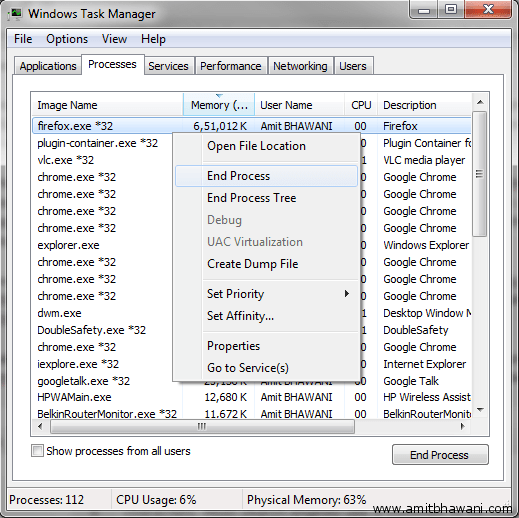
Next you need to make sure that the browser is shut down completely. This has to be opted when the browser is still running in the background. To get started press the Ctrl+Shift+Esc buttons at once to start the ‘Windows Task Manager’. Next under the ‘Processes’ menu option, you need to right click on the Image Name > firefox.exe *32 and then right click on it and select ‘End Process’ option.
If the problem of Firefox hangs – Hang at exit persist you need to ensure that you uninstall all the useless add-on’s which were installed on your computer. You can click on the Tools > Add-on’s and disable / uninstall all of them which you don’t use. Then click on Start > All Programs > Firefox > Safe Mode and start the browser in safe mode. This would ensure that all the errors are removed from the browser and it would work as usual.
Do ensure that you have remove the problematic extensions and also updated the Java to the latest version. Also the Internet Security Softwares like Comodo Internet Security, Zone Alarm, Avart! Antivirus or Norton 360 2.0 should be upgraded to the latest versions followed by restarting of the browser to ensure that their respective add-on’s are installed and updated to ensure safe browsing.
