
We have been using the Sticky Notes from the school days when we used to use the ‘Post-it Notes’ which had a little gum on the backside and the notes would be pasted on the books, computer tables, doors or even desks and the habit is still the same. Since we are more addicted to the computers these days, its better to save paper and opt for Digital Sticky Notes which are not actually pasted physically but added to your computers screen at any location using one of the Windows 7 feature which comes pre-installed.
To get started using this service you will have to first search for the application.
- Click on the Start Button
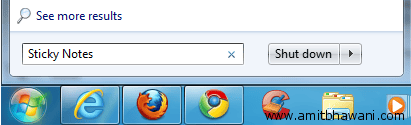
- Next at the bottom you will find a option called ‘Search Programs and Files’, here you will have to type – ‘Sticky Notes’.

- The program would be shown on the top of all the search results. Here in you will have to click on the same.
A small note would appear on your screen which is directly available for typing. You can write the note message and leave it as usual. Also you can move it around the screen by dragging and dropping at any location of your choice. Right click on the Note and you will get a list of different options like pasting text from the buffer memory or else changing color or the note to any of the available 6 colors.

At the right side corner of the Note you will find a small dragging option which would allow you to re-size the whole note and increase the content area if you are looking to add more text. Click on the ‘+’ symbol on the Note to add one more note on your Desktop.
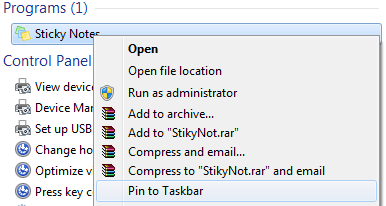
One of the biggest advantage of using this feature is that they work best on the Touch screen tablet based pc’s where you can directly start typing your notes on the screen. If you are addicted to using this feature then you can even add the program to your taskbar, by right clicking on the ‘Sticky Notes Icon’ in the search results and select ‘Pin to Taskbar’, giving you instant access to your Notes.
