Amit Bhawani Blog

Stay Updated!

Powered by Genesis

You are here: Home / Google Android / How to Upgrade Samsung Galaxy S to Android 2.2 Froyo Update

How to Upgrade Samsung Galaxy S to Android 2.2 Froyo Update

October 16, 2010 by Amit Bhawani

We had earlier written a detailed tutorial on How to Upgrade Firmware Samsung Galaxy S Android Phone which could help you in upgrading your device to the latest version. Now Samsung has announced a new firmware update from the current Eclair version to the Android 2.2 Froyo Update. In this article we will teach you how you can upgrade the device easily after a backup of all your data.

First of all you will have to install the Kies Software on your computer and then Sync Contacts in Samsung Galaxy S & Backup to PC along with Transfer Music Photos & Videos.

Next Click on the Upgrade Icon available on the bottom right section and then proceed with the options displayed on the screen.
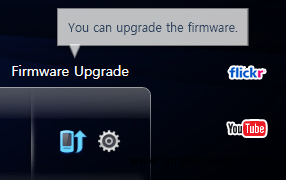
Samsung Kies Firmware Upgrade

Check out the whole process on How to Upgrade Firmware of Samsung Galaxy S i9000 to Froyo 2.2 in a step by step tutorial guide on AndroidAdvices.com along with the following video demo’s.

Device Installation Demo :

Share this:

  • Click to share on X (Opens in new window) X
  • Click to share on Facebook (Opens in new window) Facebook

Related

About

My name is Amit Bhawani and here I like to share my internet/tech experience with my online readers. You can follow me on Twitter, Facebook & Instagram at @AmitBhawani I am also the Editor-in-Chief of PhoneRadar & Master Gadgets

About Amit Bhawani

My name is Amit Bhawani and here I like to share my internet/tech experience with my online readers. You can follow me on Twitter, Facebook & Instagram at @AmitBhawani

Comments

  1. John says

    October 17, 2010 at 10:05 am

    The video on upgrade of galaxy s is quite unprofessional. Why don’t you replace it with a proper one with audio and steps rather than showing shaky images of the process.

    • Amit Bhawani says

      October 17, 2010 at 10:08 am

      Thanks for the feedback, but iam not quite habituated to the video recording with audio system. Hence its always no sound videos with text based tutorials. Will soon try to go through these kind of real demos.

Timeline

Check out Just EV Tweets by @amitbhawani

Recommended To Read

  • How to Find your WiFi Signal Strength & Dead spots in your Home – Best Apps
  • The Wuhan Corona Virus Effect in India – How to Stay Safe
  • This Blogger Lost 25Kgs with this Secret Strategy that Includes a Fitness Tracker
  • Making Money on YouTube, MCN, Useful Tools, Tips & Success Stories
  • The #JaguarPerformance Experience that was Mind Blowing