
New York Times displays the next article in such a beautiful way that in most of the cases the readers would easily click on the small button or the box and move towards reading it. The best part is that these kind of small & tiny buttons would ensure that your readers stay for a longer period on your blog and also would also decrease the bounce rate.
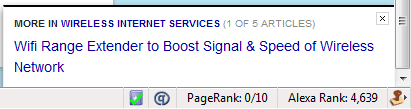
Now the same feature is available for wordpress blogs in the form of a plugin called as upPrev. When the blog reader would scroll down towards the end of the article they would see a small animated button at the bottom right corner with a link to the next article of the same category. The current available effects are fade-in or a fly-in animation and you can device what kind of animation would suit your blog.

We have currently implemented this plugin on few of our blogs to just test out the service and if this is actually liked by our readers or not. Sometimes these kind of buttons can be very useful to the readers and sometimes they would make them distracted while reading something important which is the reason its better to test it out for a few days and then compare the results through the statistics on the page views. Followed is a screen-shot of this plugin in use at this blog. Another similar plugin which you could be using is Scroll To Top Plugin

this will be very stylish
This is certainly a must use plugin..thanks was looking for similar kind of a plugin
One of the options while using this plugin is the offset percentage, where you can decide when the animation should appear – when the user scrolls absolutely to the bottom, or when he is just 60% done on the page…