
Recently while trying to access the Memory Card which came with the X-mini Happy Speakers we got an error with the message which said ‘Error 0x80070570’ and the file or directory is corrupted and unreadable. The only possible solution left was to either format the drive or else scan and fix using the default available software in the computer. We were running the drive on a Windows 7 based computer with antivirus software and anti-spyware installed on the computer to ensure that its secure for storing files and everything is scanned. The error message said ‘An unexpected error is preventing the operation. Make a note of this error code, which might be useful if you get additional help to resolve this problem : Error 0x80070570: The file or directory is corrupted and unreadable’. What could be the possible reason for this error and what could be the solution for this?

Solution : First of all you need to note that this is not a virus and there is nothing to worry about this. This error is going to show up when ever you try to transfer, delete, cut or copy files from a drive and it would give you errors like ‘can’t delete files’, ‘corrupted’, ‘unreadable’ etc. This error is commonly fixed with the Start-up Repair which is a Windows recovery tool to fix certain problems mainly the damaged and missing system files which disable windows from starting correctly. This application is located under the System Recovery Options menu and it would scan your computer for the problems and fix the same.
One quick solution to this problem is to restart the computer to ensure that there is enough free memory RAM to run the application. Then try to complete the same task which can almost fix this windows problem if not the following is recommended.
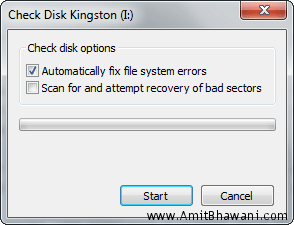
Insert the media again and try to perform the same task, you will be asked to scan and fix the drive.

This will run the chkdsk application for that specific drive and automatically fix file system errors. You can also select the option of Scan for and attempt recovery of bad sectors which can help you for a full proof scan.
Once the scanning is completed, the drive error should have gone because the check disk program would ensure all the file system errors are fixed in the above task.

A final report would be displayed as shown above which would say that there were lost chain cross-linked after the file and folder verification. All the corrections to the file systems are complete and the windows error would be fixed within these few quick steps.

I am trying to delete a directory and I get the message – file is not accessible. The file or directory is corrupted and unreadable. How do I delete?
Thanx its work
Processing Hope It Works,,, let Me See.
thank u very much!!!!!!!!!!!!!
Thanks! it worked for me after so many solutions. This method finally works! Thank you again.