
Problem : I have two different routers from Linksys & Dlink both offering good speeds of Internet Connection. From the past few months i have been using the WEP Security for Wireless Connection on my connection for making sure that unauthorized people cannot get access to my wifi. Now i want to change the security to WPA, how is it possible?
Solution : This is actually a very simple process which is available under your routers settings pages. There are many different options available for the WPA security as listed below.
- Network Authentication Open
- Shared
- WPA
- WPA-PSK
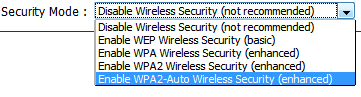
Now before we start getting into this problem, you need to make a note that your network card is compatible with 802.11g. The settings are quite similar to what you have setup for the WEP Security. You need to access the routers settings page at 192.168.0.1 with the default admin Logins provided by the router. Then click on the wireless settings page and select WEP/WPA. Since you are planning to setup the WPA which is more better and secure select this option and enter a secured passcode or password which is a combination of numbers and alphabets.

Overall a very simple way to setup the security options in your wireless router.
