
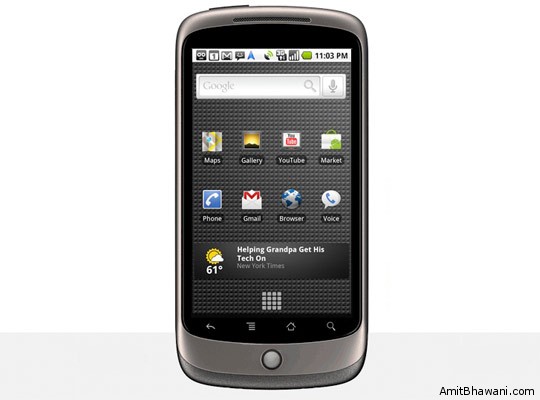
 Google Nexus One also called as the Google Cell Phone G1 is sleek, light and an exceptionally thin Smartphone, but gives brilliant power to its visual applications to the delight of the user. The back cover is made from a rubber-like plastic, which boosts users’ grip of the phone and it has 4-set of touch-sensitive controls that can be found right under the touch screen.
The Nexus One, which is built by HTC for Google, has an Android OS 2.1 on a 1 GHz Snapdragon processor. As the Nexus One applies the operating system of Google, it gives easy and convenient access to a variety of Google’s online services such as email, calendar and navigation. It has a 512MB RAM, 512MB ROM, 4GB microSD in-box expandable to 32GB. It has a 3.7-inch wide WVGA (800 x 480 pixels) AMOLED touch screen with 100,000:1 typical contrast ratio and 1ms typical response rate. Nexus One’s 5-megapixel camera has autofocus and has a trackball navigation capability. It has a LED flash and a 720×480 video capture @ 20FPS, and dual microphones for noise cancelling. There is no slide-out keyboard for this Smartphone because everything is done on its onscreen virtual keyboard.
The phone runs on the Android OS 2.1. The last version compresses the visual aspect of the OS and the 2.1 brings some fresh features such as Facebook integration, or Quick Contacts. With its 1GHz processor, it is not a pain in the pocket to buy all new hardware to take advantage of a smartphone’s high-end capabilities.
The small white trackball of Nexus One is seemingly fabulous because it can be used to scroll up and scroll down in menus, and using the trackball makes web browsing fun and easy. It lights up upon receiving messages or calls and even on missed ones. The power on/off button is placed on top left, while there is a 3.5mm jack port on the right. The power button can be used to lock/unlock the device. This is one nice feature for left-handed users because this is the only button that can change the power from standby.
With the Android 2.1 feature of this phone, it is possible to dictate messages such as SMS and emails to text, integrate multiple accounts in Gmail. There is also the QWERTY keyboard for those who do not choose to use the ‘speech to text’ feature. It easily plays H.263 videos, but unfortunately the phone has no DivX/XviD support. It can support.mp4,.3gp,.3g2,.m4v video formats though.
HTC Google Nexus One has all possible connectivity tools that must be included in a state-of-the-art device like the GPRS and EDGE class 10, HSDPA 7.2 Mbps and HSUPA 2 Mbps, Wi-Fi 802.11 b/g, Bluetooth 2.1 with A2DP, and microUSB 2.0.
Nexus one is quite expensive but with the features and applications included in this smartphone, its price is worth the purchase, especially for businessmen who will enjoy its fast and easy applications.
Google Nexus One Cell Phone Photo Gallery :


stylish phones with lots of features
Thank You For Posting. Now I can Buy This Phone
Isn’t the gallery the T-Mobile G1?
Not the Google Nexus one. Huh?
Nice find Krishna – Update the article with the right pictures.
Nice phone mate,,