
Technology has undoubtedly made our lives simple and complicated at the same time. Simple because almost everything we once dreamt of is slowly becoming a reality and complicated because we have become even more dependent on gadgets around us. Who would have thought of carrying a CD with enormous amount of storage space nowadays? Blu-Ray technology from Sony has certainly revolutionized the media storage industry. BD format is slowly and steadily making its mark and giving the DVD and CD, a run for their money. With colossal storage space in a Blu-Ray disc, the prime question arises for the ripping or copying the data or making a back up of the data stored on your BD. How do we rip the BD? In addition, Blu-Ray discs are usually copy protected that makes the ripping procedure all the more complicated.
The solution to this is the BLU-RAY RIPPER, a revolutionary software that allows you to rip the data and make back ups of your favorite Blu-Ray discs with simple steps. Ripping a Blu-Ray disc use the advanced CSS encryption protection, ACSS protection. So Blu-Ray decryption software with all features is required to rip a Blu-Ray disc. The software are hard to get and even harder to operate successfully. Moreover, of course it is neither free, they do carry a price tag to obtain the full version. It is hard to rip BD but not impossible. With BLU-RAY RIPPER, it can be made easy with a few simple steps to rip the video to a number of formats harmonizing with your preference.
To rip a BD you need:
- Windows based PC installed with ripping software and a lot of free storage space. By a lot of free storage space, we mean space to the tune of 80GB.
- Compatible Blu-Ray drive to allow the process of ripping
- A compatible and fully functional BD decryption software- you may try the free trial version or buy the software
- An understanding about the different video codec and conversion formats
The BLU-RAY RIPPER is the driver that sits in the background and allows the BD to be ripped by automatically removing the ACSS protection or BD security lock along with region code for smooth operation.

Certain requirements to rip a BD with BLU-RAY RIPPER are:
- A PC installed with Microsoft Windows Vista/XP/2000
- Intel or AMD processors with minimum 1GHz clock
- Minimum monitor resolution of 800 : 600
- Color depth of 32 bit
- Minimum RAM requirement – 128 MB
So equipped with the entire set of requirements, you are ready to download the trial version or purchase the full version of BLU-RAY RIPPER. Install the software on to your windows PC and now you can choose how you want to convert the video. The Blu-Ray Ripper can be used to rip the Blu-Ray discs and general DVD to AVI, MPEG, MP4, FLV, WMV, RM, MKV, iPod, PSP, and many other formats. It can also be used to rip audio to AAC, AC3, MP3, OGG, and WMA. The input formats supported by the BLU-RAY RIPPER are Blu-Ray DVD, HD, D9, and D5.

- Start the Blu-Ray DVD Ripper program
- After this step: Click button to open Blu-Ray or a general DVD
- Click “Profile” combo box to choose an output format
- You may select the start and end time, the video you want to rip and include the subtitles too.

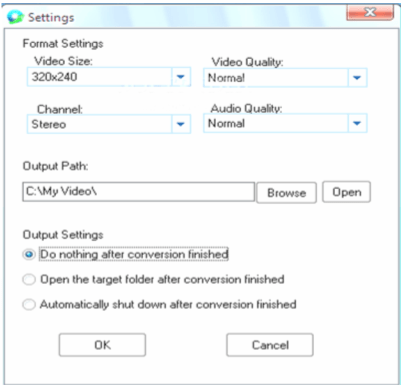
You may also select the properties to obtain the video output size and other advanced features according to your preference. You must preview before you start the ripping process to make sure that dimensions and the aspect ratio are suitable to you.
- With Blu-Ray ripper, one can cut any segment of the data on the Blu-Ray or the DVD and make smaller video clips after choosing the start and end time.
- The output file is ready to be stored in your device and in your desired format. This is the magic of BLU-RAY RIPPER. Any DVD or Blu-Ray can be handled by the software and can be used to create a back up on your hard disk without damaging the original DVD or BD.
- Select the output format to which you want to convert the video to and save the destination

Click Start button to start ripping, Key features of BLU-RAY RIPPER
- Rip Blu-Ray and DVD to various output formats, like AVI, ASF, MPEG, MP4, WMV, MKV, MOV, FLV, SWF, RM, 3GP, etc
- Audio format ripping to AAC, AC3, MP3, OGG, WAV, WMA, M4A, RA, Aiff, AU
- Rip with highest rate and with quality high definition
- Support following Multimedia devices:
- Rip the recent movies and regular software updates
- Shut down computer automatically after ripping the Blu-Ray disc or DVD
Blu-Ray to Apple TV, iPod, iPhone, Gphone, PSP, PS3, Xbox, Mobile Phone, Windows Mobile, PMP, HD Video
Guest Writer – Bob has been writing Technology related articles from years and is also a Software Developer at www.qiqisoft.com
Good info…thanks
Thanks for the guide. QUite a few of my precious dvd are getting scratched, so time to make some backups!