
We had earlier shown you a simple way to automatically tweet your blog posts using third party services. The very same way you can easily publish your latest blog posts automatically whenever you publish a new article on your blog. Facebook is growing and with a bigger network under your profile you can increase the visitors to your blog by publishing links to your articles and making your friends read them. Facebook would display your updates on the front page of your friends home feed which increases the chances of getting readers easily.
We have been using this service from he past few months which has been displaying full articles to the Facebook readers directly when they click on the links published. The service from NetworkedBlogs Application for Facebook would need you to register and then link with your blog. The application would fetch your blog content and bring the same to your facebook account and promote it within your community. The blog would be displayed under your facebook profile and a tab would also be displayed for the same. You can also submit your blog to the directly which could be searched by other people who are searching for blogs on your topic. Here is the process for the same.
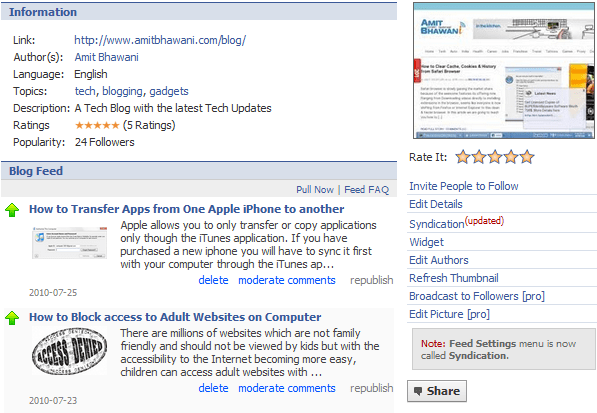
To get started visit this page – http://apps.facebook.com/blognetworks/ and click on the ‘Register a Blog’ button on the top. Make a note that you can submit your blog to this application but you cannot create a new blog using this.
You will be asked to Enter the Blog Name which should be short for branding purpose. Next the URL which is the homepage location of your web blog. The topics section would be limited to 3 main tags which should be entered based on the priority. Enter a long useful description which could be useful for anyone to read and understand what kind of information they could find at your blog. Enter the email address to which you would like to get communication messages.
Once the registration is completed you will be able to Auto-publish to personal profile. Click on the Syndication option to customize and set advanced settings to make sure that you can publish posts which are written by specific authors only. This is useful in case you want to just display the articles written by you in a large blog authored by multiple writers.
Adding the Blog Feed to Fan Pages : Under the same Syndication options you will find the Facebook Fan Pages section where in the list of all the Pages you have created would be displayed. Click on Actions > Configure > Install button.
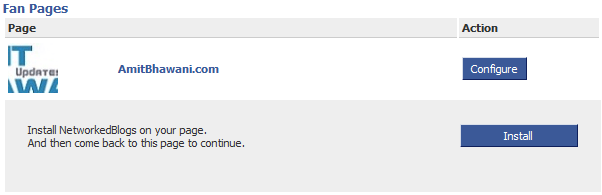
You will be asked to confirmation this process following which the application will pull your page’s profile information, photos, friends’ info, and other content that it requires to work. It will also add a box to your page and can publish Feed stories about your page.
You can check out our Networked Blog at http://apps.facebook.com/blognetworks/blog/tech_blog/ and follow the same to get quicker updates directly to your facebook account. You can also increase the followers to your blog by promoting the same. Click on Widget link to get a widget like the one which is created below.


RSS Graffti another alternative 🙂
RSS Graffti does look good, will try to feature the service too.
Nice tip..thanks for sharing
Well, I will do it. Its a good option as its automated.
can we also use the images as a part of update
Can you explain in detail regarding what kind of use of images you are talking about?
I implemented the above steps but feeds from my sites were displayed correctly, the only problem came in is with the Thumbnails.