
 Apple unveiled iOS 4.2.1 GM for iPhone 4, 3GS, 3G, iPad and iPod touches just a day back. The software build which is currently available for the developers can be jail broken using the version 0.9.6b2 of Redsn0w. There have been many feedbacks about Cydia not being working as Apple has changed some of the private API’s which is stopping Cydia to work but well know that this will be for some period of time. So the good part is that iOS 4.2.1 compatible version of Cydia is ready and is available as iOS 4.2.1 is released to public. Also you can install jailbreak apps as you have now full root access to your device via SSH until the new version of Cydia releases.
Also note that the supported devices are iPod touch 4G / 3G / 2G and also iPhone 4, 3GS, 3G. For people who are on carrier unlock should not attempt this procedure to unlock of iOS 4.2.1
Procedure to jailbreak iOS 4.2.1 GM release with Redsn0w 0.9.6b2:
- First you need to Download iOS 4.2.1 GM & also iOS 4.1 for your iOS device which is essential for Redsn0w 0.9.6b2.
- Now, you just need to update/Restore to iOS 4.2.1 firmware using the IPSW file you just downloaded from Apple iTunes 10.1.
- Now start Redsn0w 0.9.6b2 and point it to iOS 4.1 (Final Version, NOT iOS 4.2.1) to proceed with the jailbreak process.


- Now Browse for IPSW file and proceed to click on Next after selecting the same.

- Now make sure your device is both OFF and PLUGGED IN to the computer before you click on Next.
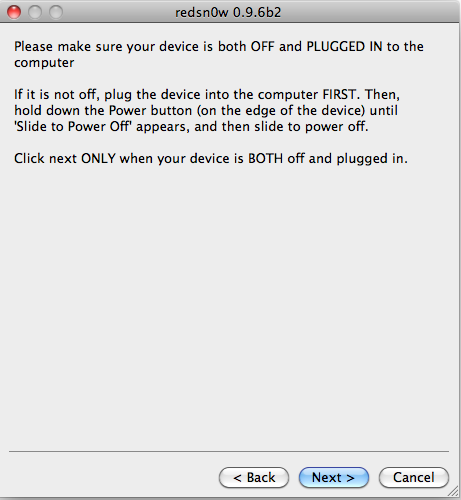
- Now after clicking on next, you will be presented with a screen where you will have to quickly hold “Power” button and then while holding the “Power” button, you will now have to hold “Home” button too. Now after few seconds you will have to release “Power” button but at the same time keep holding “Home” button until installation begins.
You will Get a Jail broken Device on the latest iOS 4.2.1 GM as soon as the process ends. Please note that, If you have an unlocked iDevice with ultrasn0w then its recommended to stay away from Redsn0w, as it updates your base band to latest version, which is still un lockable at this point of time. You can also view our visual guide to jailbreak iPhone 3G using Quick Pwn.